VideojetConnect™ Inspect enables Quality Assurance Personnel to automate their compliance standard work. With Inspect: Automated QA there is less paperwork and an easier, more organized approach to controlling the QA process.
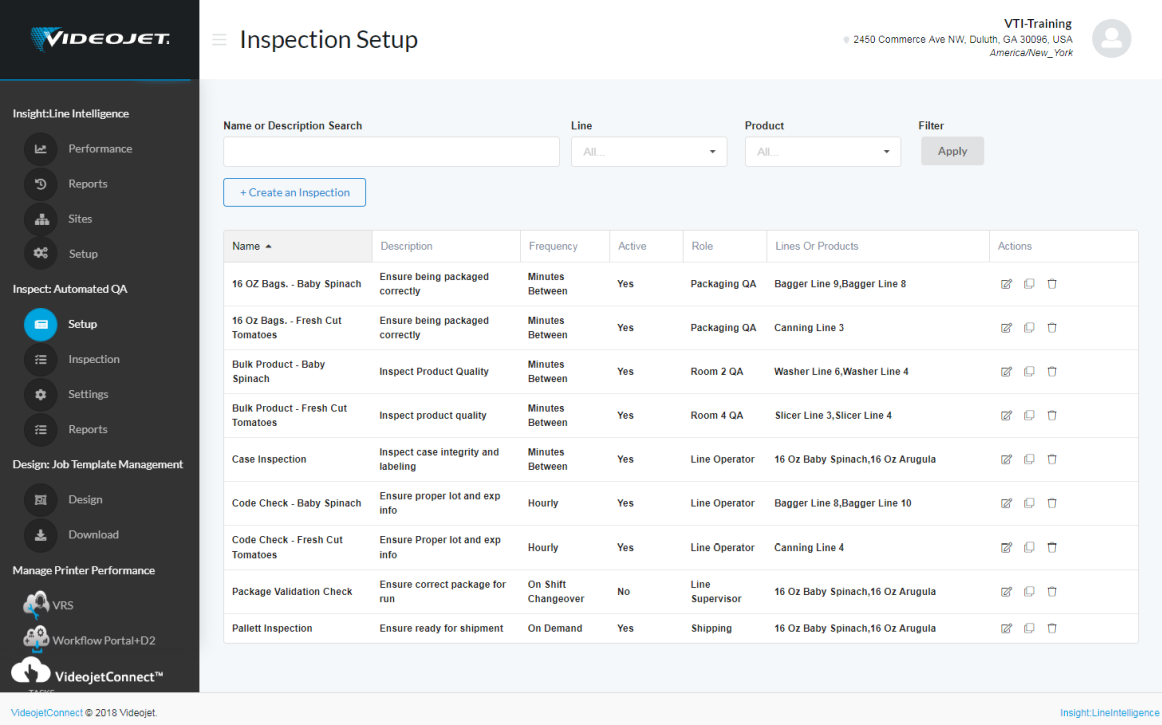
With Inspect: Automated QA You Can:
- Create and access inspection forms online
- View a filterable dashboard that indicates which inspections are due and upcoming
- Complete inspection forms with any HTML5-enabled device and automatically create an electronic record and signature
- Create automated standard work for the review and sign-off process
- Quickly find and access completed individual inspection forms when required
- Run configurable reports to spot trends in failed or missed inspections
Inspect: Automated QA works with Insight: LineIntelligence by utilizing Lines, Products, Shifts, and User Roles created in Insight: LineIntelligence
Create and Assign Inspection Forms:
- Create multiple inspection sets
- Assign to specific lines and/or products
- Delineate between start-up and ongoing inspections
- Input the inspection activities for each inspection set
- Assign an inspection frequency
- Assign the rights to create and perform an inspection to specific user roles
- Revision control tracks changes
Inspection Visibility
- The filterable dashboard indicates which inspections are due and upcoming
- Applicable online Inspection form is accessed simply by starting the inspection
- Inspectors can view the inspection schedule for the current shift to know when the next inspection is due
- Configure the system to allow inspections to be completed at a non-scheduled time
Completing the Inspection
- Directly choose pass/fail or enter a value for the system to compare against a predefined reference
- References (which can include images) can be accessed as well as tolerance levels
- Comments and/or photos can be added to provide further color to the results
- Sign-in is required on save to create an auditable electronic signature
- Records are time-stamped to ensure the inspection was completed as scheduled
Inspection Reports
- Search and view individual inspection records
- Records can be set to be stored for a specific amount of time and then automatically destroyed
- Create filterable reports that summarize inspection results over the defined time period (including shift) and inspection criteria (plant, line, product)
- Create filterable reports related to “missed” inspections
- Report filters can be saved and reports configured to be e-mailed on an established cadence
Inspect: Automated QA is offered as a separate subscription, please contact your Videojet Software Sales Representative for more details